Blog How to Make a Chatbot with a Better UX
With the increasing interest in bots and conversational User Interfaces (UIs), our User Experience (UX) teams are often asked, “How can we improve the overall user experience when a bot’s user interface is oftentimes so limited?”
By Ryan Stryker / 22 Aug 2018 / Topics: Artificial Intelligence (AI) , Application development , Customer experience

In a related article, “Want to Build a Chatbot? It Takes Technology and UX,” Adam Deardurff provided an outline for leveraging a proof of concept to refine bot use cases and introduced the concept of “designing” the experience. Knowing that the term “design” can be ubiquitous, we wanted to elaborate on a few of the often-overlooked non-UI areas a UX team should be engaging on a bot project. These tips and tricks should help your teams and clients build better bots.
Create a chatbot introduction message and clearly state why it exists/what it can help with. Is your bot there to help with frequently asked questions, access to phone numbers or bus schedules? Strive to help users avoid spending large amounts of time trying to find the specific information they need only to discover it doesn’t exist.
Come up with a chatbot name, but avoid using your brand/company name or even a human name (we all know we aren’t talking to Karen, Susy or Jeff). This a chance to add a little whimsy and subtle hints to the user about the personalized experience they're about to have while aligning with your organization’s desired brand perception. If naming your bot makes you nervous, get someone from your marketing team to help. A fun (and well promoted) example is Dot, Akron Art Museum’s chatbot.

Give your chatbot a profile picture, and it’s important to remember this is another touchpoint to represent your brand and positively impact your users' first impression. Skip the logo icon or customer support stock photo in favor of building a narrative around your bot’s character. This is a great opportunity to market your new bot and give it life.
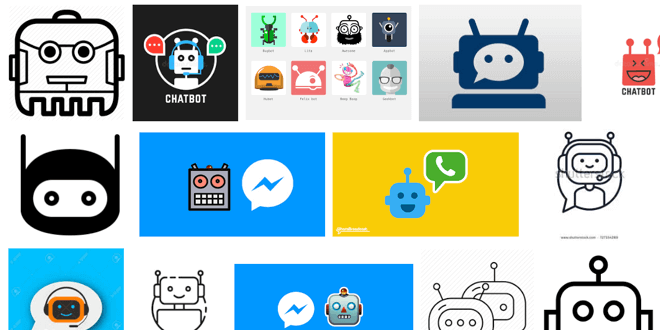
Using an illustration allows you to create a character and still provide a “face” for the profile picture a user expects to see. An easy and popular choice is to use a robot. For some inspiration, take a look at the examples we found on Google Images.
Your communication shouldn’t sound like a robot. While you’re still in the planning phase, it’s OK to focus on identifying your conversation map (initial prompt and response options). Revisiting those touchpoints to identify your bot’s voice and tone before a user interacts with your bot will go a long way toward making a good first impression. If you’re new to considering voice and tone and how to use it in your products, Mailchimp does an excellent job explaining its guidelines and distills the concept as follows:
“What’s the difference between voice and tone? Think of it this way: You have the same voice all the time, but your tone changes. You might use one tone when you're out to dinner with your closest friends, and a different tone when you're in a meeting with your boss ...”
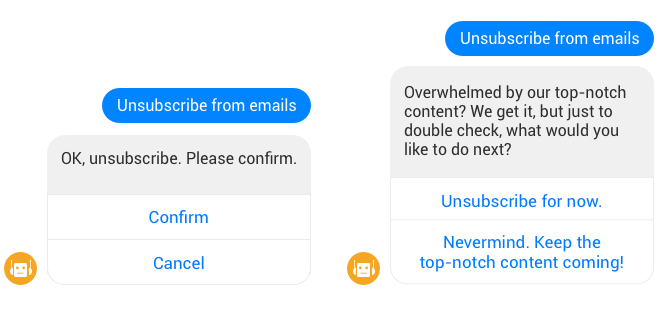
For example, look at the subtle differences between these two conversations:
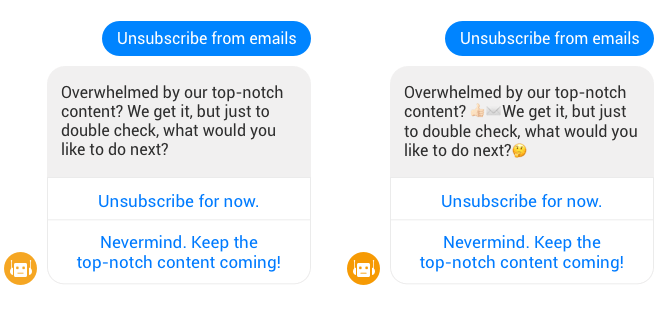
With the popularity of texting, you can also consider adding emoji (if your brand allows) to increase visual feedback and help convey the sentiment behind your statements. We’ve all experienced sarcasm gone wrong in an email or text. If your bot serves an international customer base, the use of jargon, references and colloquialisms may get lost in translation. This is where an emoji may help give added context.
If you don’t have support from marketing and don’t consider yourself “creative,” you can always do a quick message architecture exercise with your team to help define who your bot is and isn’t.
Journey isn’t just a band; it’s the planned and unplanned path your user may take to engage with your bot. Users frequently complain they get “stuck” interacting with bots, or that a bot is “dumb,” when in reality it’s not the bot’s fault at all — the blame rests on your team’s ability to guide your user through a journey.
Leverage journey mapping and task-flow techniques to ensure each prompt and response option is covered. Mapping out these possible decision trees will help you and your team identify dead ends and anything that strays from the “happy path.”
An easy way to keep users on the happy path is to use leading questions (I know, I know, anyone who does user research is cringing) and provide affirmation when they choose the option you intended.
Outside of journey, the form factor will play a large part in matching or exceeding a user’s expectations. Here are a few guiding questions to consider:
- Will our bot only be used on a mobile device, or do we need to consider desktop users? What about voice?
- What type of inputs are easiest for the user at the time of use (multiple choice, open text, number entry, voice, etc.)?
- How can we mimic any channel-specific (Facebook, Skype, Teams, web, etc.) nuances to help reduce onboarding friction and provide a seamless experience?
With each of these areas covered, don’t forget users still might run into a situation where your bot can’t help and they need an escape hatch. In that case, be sure to give them an option to get help outside the bot experience and reach a real human via phone, email or integrated customer service chat, etc.
It’s not goodbye; it’s see you later. Your bot has done its job, and your users are satisfied. So, now what? This is an often-overlooked opportunity to engage with your users for your benefit (and theirs). A few great ways to sign off or set up future engagements include:
- Check to see if a user is done with the session and explain how to re-engage.
- Ask the user to rate his or her experience.
- Direct the user to your brand’s social media.
- Offer users a discount or incentive in return for simple data mining.
Wrapping up, we hope these tips and tricks will provide a few conversation starters for teams building their first bot and the ways a UX professional can help improve your users' overall bot experience. Just remember: Even though a bot may not include the typical UI design focus other digital products do, several experience considerations can help your bot stand out in a crowd and increase both user adoption and satisfaction.

Ryan Stryker
User Experience & Design, Practice Manager
With a user-centered design approach, Ryan's role is a blend of user experience competencies, including user research, content strategy, information architecture, interaction-focused visual design and front-end development. He's well-versed in delivering user experience artifacts in an Agile (or iterative) manner.
 Monthly perspectives from global tech leaders.